 DigSearch
Why DigSearch is the best search tool you'll use this year
Below is every problem the built-in OS search makes you live with, and exactly how DigSearch fixes it. Skim the bold lines if you're in a hurry. Read the rest when you have a search that just defeated you.
Drowning in giant folders
Windows and Mac search are slow, awkward, and bad at narrowing down.
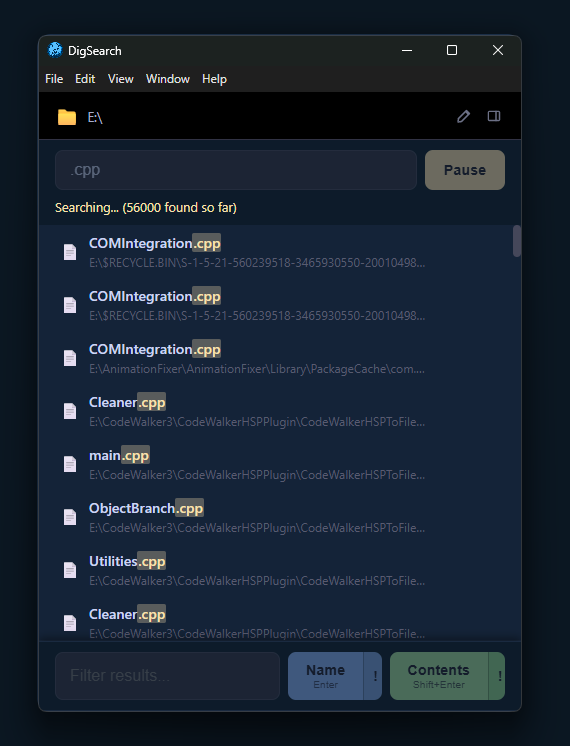
DigSearch lets you drop a folder and search filenames or file contents directly, with batched results streaming in as the walker runs. You start seeing hits in milliseconds, not after some indexer eventually gets around to it.
Refining a search without starting over
Built-in OS search forces you to retype the whole query when you want to narrow further.
DigSearch's cascading tiers let you lock in .cs, then filter that by March, then by utils. Each tier feeds the next, and you can edit any tier to fork off in a new direction without losing your place.

"Find everything that is NOT"
Most file searchers can't easily exclude.
The ! negate button on every Name and Contents button inverts the match per-tier, so you can carve down by exclusion just as easily as by inclusion.
Searching inside file contents, not just names
You want to find a code fragment or a sentence you remember writing - not a filename.
Tier 0 Contents and Tier 1+ Contents read file text directly, skipping binaries, so you can find code, notes, or text fragments across thousands of files and then layer name filters on top.
Previewing without leaving the app
You have 50 candidate hits and no patience for opening every one in its native app.
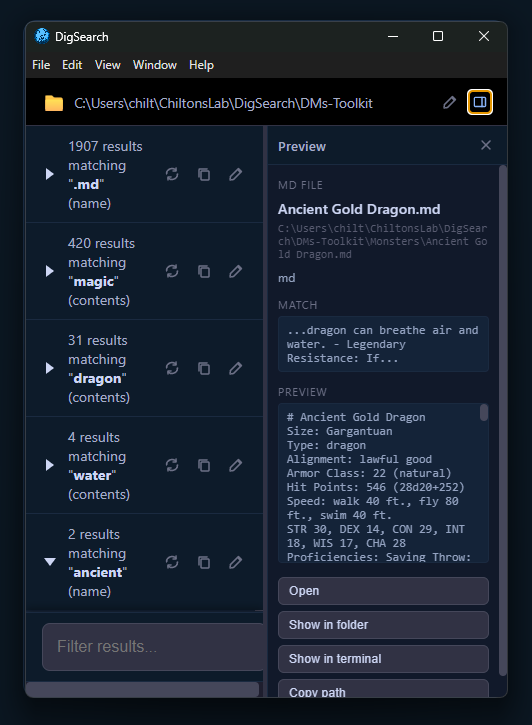
Click any result and DigSearch auto-opens a right-side pane with an image thumbnail or a 4 KB text snippet, so you can verify a hit at a glance.
Path-fragment matching
You want everything inside Assets/ but you don't want to write a regex.
Type Assets/ into the Name filter and DigSearch matches anything whose path contains that fragment, so you can constrain by folder location without a single special character.
Losing your search state
You spent twenty minutes building the perfect tier chain. Then you close the laptop.
Save Session and Open Session write the whole locked-tier chain - folder, queries, modes, negate flags, results - to JSON so you can resume the investigation later, exactly where you left off.
Repeating the same searches
You search the same handful of folders over and over, and the OS treats every one like a stranger.
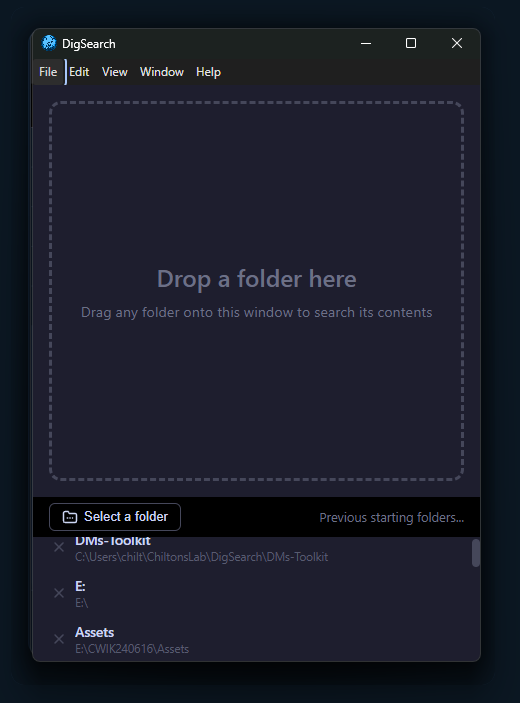
Folder history on the start screen tracks the last 50 folders you've searched, so you double-click back into them. Per-tier Reload re-runs a tier and cascades down to refresh every locked child, so you can pick up file changes since the last search.
Getting paths out of the app
You found the files. Now you need their paths in your next tool.
Hover any row to copy a path or reveal in OS explorer. The locked-tier clipboard icon copies every matching path at once, newline-separated, so results flow straight into the rest of your workflow.
Running on a borrowed or shared PC
You're on someone else's machine, you don't want to leave traces, but you need real search.
The portable build redirects every piece of state - folder history, registration, Electron cache - to a DigSearch-Data folder next to the .exe. Run it from a USB stick and walk away clean.
One registration, multiple machines
Most apps tie a license to a hostname and break the second you log in on a new account.
DigSearch's device ID is stable per install, stored in a .registration file. Copy the file or run the portable build on another machine, and your registration follows.
Long, unwieldy result lists
A search that returns 80,000 hits hangs every other file manager you've tried.
A 100-row display cap per tier with an "etc." overflow row keeps the DOM responsive on huge searches while preserving the full result set for the next filter to work on.
Ready to register?
If you've read this far you already have a search in mind that you'd like to solve. Try the free build first - then come back and unlock the rest.