 VoiceOverAndOver
Read it. Record it. Fix any line in one click.
VoiceOverAndOver is a voice-over recorder that thinks in paragraphs, not waveforms. Flub a sentence? Re-record that row. Need captions? Already written. Hit Export and you're done.
No DAW. No splicing. No "starting over from the top." Just your script, your mic, and a clean final file when you want one.
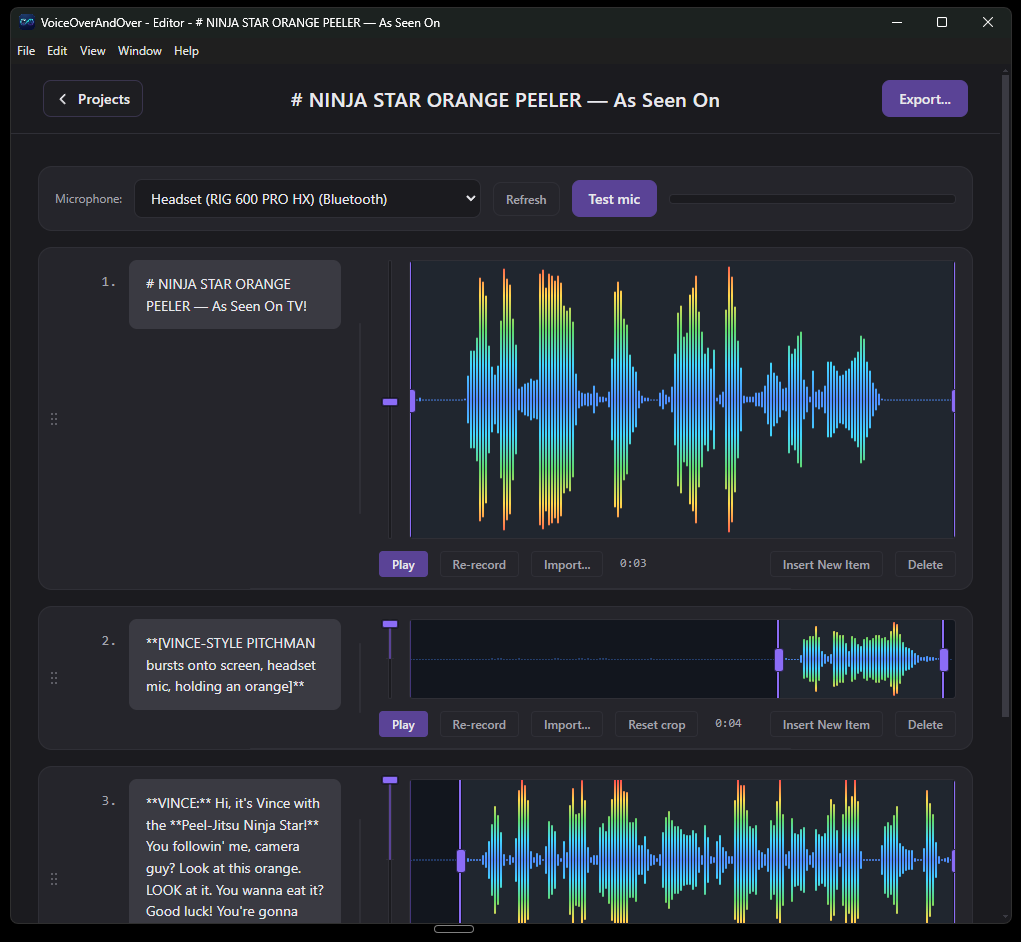
The whole workflow, in four screens
Import a script. Record paragraph by paragraph. Rearrange and crop. Export with captions. There is nothing else to learn.
1. Drop in your script
Paste it, or drag a .txt or .md file in. The app breaks it into paragraphs and tells you how many takes you're signing up for.
2. Record one paragraph at a time
Hit record on a row, read the line, stop. Flub it? Click Re-record. The first paragraph and the last paragraph get the same energy and the same take count.
3. Crop, reorder, and rebuild
Drag rows to reorder. Crop the silence off either end. Insert a new line anywhere. The merge step is one click away whenever you're ready.
One click to Export. Captions are free.
Equalize every paragraph to the same LUFS target so the final file is consistent end to end. Tick a box and get SRT, WebVTT, Premiere/Resolve markers, and an Audacity label track in the same export pass.